In this post we demonstrate some of the basic ideas of vertex colouring. In
particular, we demonstrate the following result.
Theorem 1
For every graph , .
One proof of this result is found on p.182 of (Chartrand & Zhang, 2008)
where it appears as Theorem 7.8. The proof is no more than a
precise version of the observation that if we apply a greedy vertex colouring
then we only need at most colours because if we have that many
colours then when it comes time to colour a certain vertex one is bound to be
missing from the at most
neighbours of that vertex.
Greedy Vertex Colouring
The greedy vertex colouring algorithm starts with the vertices of a graph listed
in some order . It begins with the first vertex and
assigns that vertex colour 1. To colour a vertex further along in
the sequence we choose the first colour which is not used on any of the already
coloured vertices .
Below is an implementation of the greedy vertex colouring algorithm for NetworkX
graphs. In fact, this implementation is a little more flexible than the one
described in the previous paragraph. It allows for some customisation of the
algorithm’s behaviour. Specifically, it allows use to specify both the ordering
of the nodes and the strategy used to select which colour to use one a
particular node.
Here we have only implemented one strategy, the first_available strategy of
the greedy algorithm which chooses the first colour not used on already coloured
neighbours.
deffirst_available(G,node,palette):"""Returns the first colour in palette which is not used in G on any
neighbours of node, where D is the maximum degree."""used_on_neighbours=[]forvinG[node]:used_on_neighbours.append(G.node[v].get('colour'))available_colour_set=set(palette)-set(used_on_neighbours)returnsorted(available_colour_set)[0]defvcolour(G,choose_colour=first_available,nodes=None):"""Visits every vertex in G and assigns a colour from [0..D] given by
the choose_colour function object, where D is the maximum degree"""ifnodes==None:nodes=G.nodes()degseq=G.degree().values()ifdegseq!=[]:palette=range(max(degseq)+1)else:palette=range(1)fornodeinnodes:G.node[node]['colour']=choose_colour(G,node,palette)
Notice that this implementation colours graphs in-place. It adds a colour
attribute to every vertex and the value of this attribute is the colour given to
that vertex.
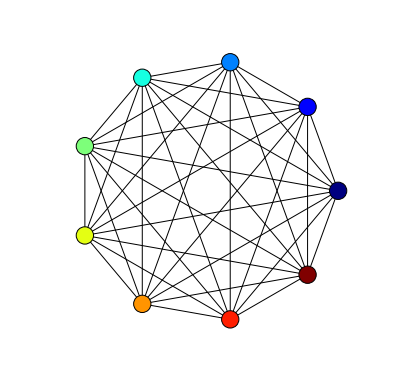
Below is an example of using the greedy colouring algorithm to colour .
By the earlier theorem we would expect a colouring with 9 colours, as
.
importnetworkxasnxsetfigsize(5,5)options={'with_labels':False,'node_size':300,'width':1,}defcolours(G):"""Returns a list of colours used on vertices in G."""return[x.get('colour')forxinG.node.values()]K9=nx.complete_graph(9)vcolour(K9)nx.draw_circular(K9,node_color=colours(K9),**options)
The colours function gets a list of colours used on vertices which is then
passed to the draw_circular function as the argument of a keyword parameter
node_colour.
We put other options into a dictionary object so that we can reuse the same
options in other drawings below.
Colouring a complete graph doesn’t pose much of a challenge to any colouring
algorithm. All that is needed to assign a different colour to each vertex so
algorithms even simpler than the greedy algorithm will succeed in this case to
find a minimal colouring.
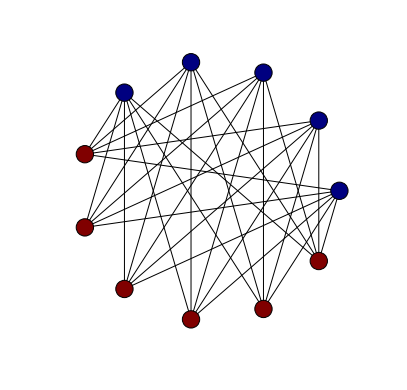
A slightly more challenging graph is a complete bipartite graph. If we consider
, for example, the above Theorem only guarantees a colouring with 7
colours. A minimal colouring, however, uses only 2 colours.
It isn’t really all that surprising that we found a minimal colouring here. If
we have managed to colour some of the vertices properly with only two colours in
such a way that all vertices of one colour lie in one of the bipartitions and
all the vertices of the other colour lie in the other bipartition then it’s
obvious how to extend this to a similar 2-colouring with fewer uncoloured
vertices.
Colouring Some Classic Graphs
In this section we apply the greedy colouring algorithm from the previous
section to some well-known graphs and compare the number of colours used with
the chromatic number.
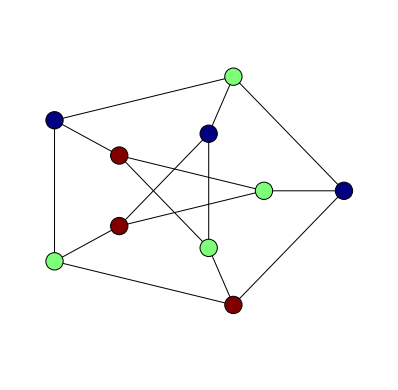
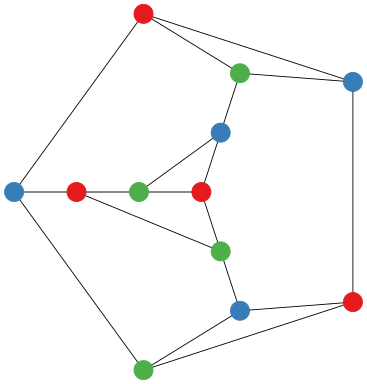
First we consider the Petersen graph. It is known to have chromatic number 3
and, indeed, with our greedy colouring algorithm we find a 3-colouring.
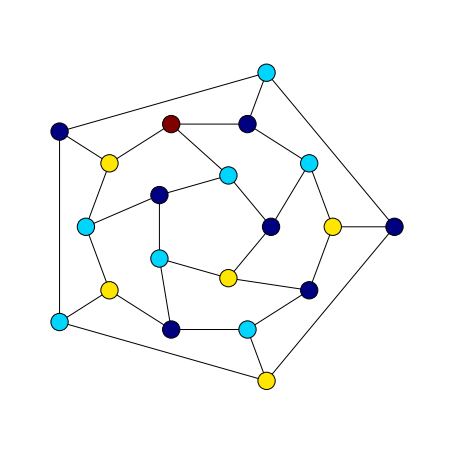
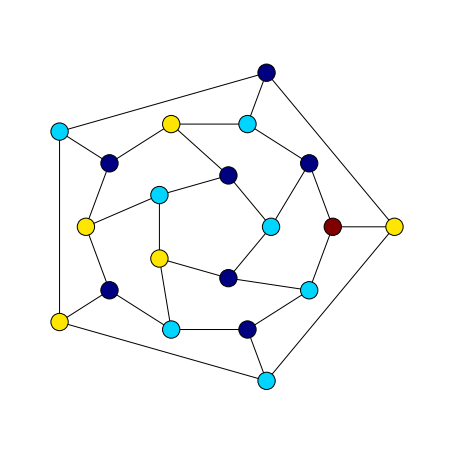
The dodecahedral graph is a slightly different story. It also has chromatic
number 3 but with the greedy algorithm we find a colouring with four colours.
A 4-colouring of a 3-regular graph is still in accordance with Theorem 1. We
might, though, do better by experimenting a little with node orderings or colour
choice strategies. The first thing worth trying would be a few random orderings,
hoping to hit upon one that uses only 3
colours.
In this post we introduce gvpr a graph stream editor which belongs to the
Graphviz software library. As this is our first post about Graphviz
and gvpr is, perhaps, not the most obvious place to start we will begin this
post with a demonstration of another program from Graphviz, gc. After that
we will introduce gvpr and show how gc can be implemented in gvpr.
Our main interest in gvpr is related to last week’s post in which we were
faced with the problem of applying a colouring found by Culberson’s colouring
programs to a file containing graph data in DOT format. In that post we found
an ad-hoc solution based on a Bash script and Sed. The approach we use here,
based on gvpr, is much nicer but still might not be the best
possible solution.
Counting Components with gc
GNU Coreutils, a collection of programs available on any Linux
or Unix-based operating system, contains a program wc which is
used to count words, lines, or characters in a document. As an example
of using wc, here we calculate the number of lines, words and characters
in the man page for wc.
$ man wc | wc
     70     252    2133
The Graphviz program, gc, can be thought of as a graph analogue of wc. If
a graph is stored in DOT format then we can get basic metric information about
the graph by invoking gc. For example, here we calculate the number of nodes
in the Tutte graph.
gc can do some other things beside count nodes and vertices. It can also
count components and clusters (which are subgraphs that are labelled as
clusters). To do anything more sophisticated than merely count objects
belonging to a graph we need to write another program. As we are processing
text data, Sed and AWK are good choices for implementation language. Even
better, though, is gvpr which has a similar approach but is designed to
process data in DOT format.
gvpr - The Graph Stream Editor
gvpr is an AWK for graphs in DOT format. It is a stream editor which
can be easily customised to process graph data in user-defined ways.
Implementing gc in gvpr
There are several simple examples of programs written in gvpr in the
gvpr manual. One of those programs is the following gc-like
program implementation. As an introduction to gvpr, in this section we
will explain how this program works. The entire source code is shown
below.
BEGIN { int n, e; int tot_n = 0; int tot_e = 0;}
BEG_G {
 n = nNodes($G);
 e = nEdges($G);
 printf("%d nodes %d edges %s\n", n, e, $G.name);
 tot_n += n;
 tot_e += e;
}
END { printf("%d nodes %d edges total\n", tot_n, tot_e) }
If the above code is in a file called gv and that file is located in a folder
on one of the paths in the GPRPATH environment variable then we can invoke
it in by calling gvpr with the filename gv as the argument of the -f
switch.
The program works in the following way. gvpr processes the input graphs
one at a time. Before doing any processing, though, it calls the action
of the BEGIN clause. For our program this merely has the effect of
initialising some variables we will use to count edges and vertices.
Now gvpr moves onto processing the first graph. Once it has processed the
first graph it moves onto the second, and so on, until the last graph has been
processed at which point it calls the action of the END clause. In our gc
program this prints out the total number of edges and vertices over all of
the graphs.
When gvpr processes each graph it first sets the variable $ to the current
graph and then it calls the action of the BEGIN_G clause. It will then do some
processing of nodes and edges (explained in the next paragraph) before calling
the action of the END_G clause after each graph. In our case, when a graph is
processed by gvpr we count the number of edges and vertices, print those
numbers out and add them to the total edge and vertex count.
The innermost processing that gvpr does is to consider every node and edge.
Any number of N and E clauses can be implemented to create some specific
behaviours at nodes and edges. For example, we might provide actions to weight
a node or edge with a particular value or other or we might set attributes,
like the position of a vertex according to the result of a layout algorithm.
The N and E clauses both support predicate-action pairs. This means that
the action will only be run if the predicate belonging to the predicate-action
pair is satisfied as well as the main N or E clause (which is only true
when we have encountered a node or edge).
N [ predicate ]{ action }
E [ predicate ]{ action }
In the next section we consider a different application of gvpr. We show
how it can be used to take the output of a colouring from ccli and apply
it to the vertices of a graph which can then be passed to one of the layout
programs for drawing.
Colouring Vertices with gvpr
Our implementation of applying a colouring to a graph in DOT format in
gvpr is just three lines of code.
BEG_G { setDflt($, "N", 'colorscheme', 'set13') }
N { aset($, 'style', 'filled') }
N { aset($, 'color', ARGV[$.name]) }
The basic structure is familiar from the gc-like implementation above. We
have three clauses, a BEG_G clause and two N clauses. The action for
each clause is a call to one of two different functions setDflt and aset.
The setDflt function sets the default value of an attribute . As we call this
function in the body of the BEG_G clause the built-in variable $ is set
to the current graph. In this case we are setting the default value of the
colorscheme attribute for nodes to the set13 colour scheme. Graphviz
provides several different colour schemes. The following
quotation from the gvpr manual explains how colour schemes work.
This attribute specifies a color scheme namespace. If defined, it specifies
the context for interpreting color names. In particular, if a color value
has form “xxx” or “//xxx”, then the color xxx will be evaluated according
to the current color scheme. If no color scheme is set, the standard X11
naming is used. For example, if colorscheme=bugn9, then color=7 is
interpreted as “/bugn9/7”.
The aset function sets the value of an attribute. As we use the aset function
in the body of actions that belong to N clauses we are going to be setting
attributes of nodes. When gvpr is processing nodes is assigns the current
node to the built-in variable $. So the syntax aset($, x, y) assigns the
value y to the attribute x.
We set two attributes for every node. We set the style attribute to filled
so that when the output graph is rendered by one of the drawing programs in
Graphviz the nodes will be drawn as filled-in shapes, making the colour visible.
The other attribute we set for each node is the color. In this case, the
color is set to a value which is determined by the corresponding value of
ARGV.
To use our program, call gvpr with the colour program as the argument
of the -f switch. Then to provide the vertex colouring we pass a string
to gvpr as the argument of the -a switch (this is then available inside
of a gvpr program as the value of the ARGV variable.
The resulting drawing with coloured nodes looks like this:
For more information about gvpr, a good reference is the
man documentation. The source code for our program is
here. The source for the above demo is here.
Continuing from last week’s post, in
this post we will demonstrate how to use the osage program from
Graphviz, to create rectangular drawings of coloured queen
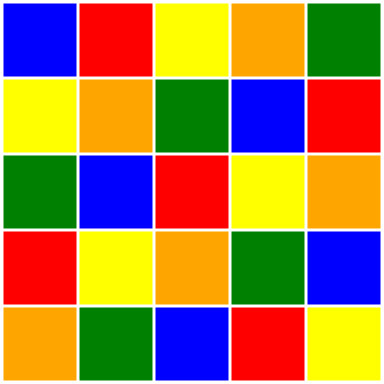
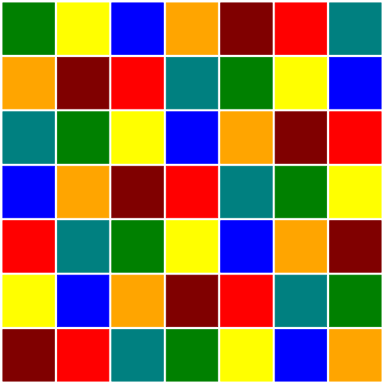
graphs. The drawings produced, like the one below, resemble coloured
chess boards. Edges in these drawings are invisible but, as we will explain,
it is still easy to decide whether or not the colouring of the graph is proper.
Beginning with a queen graph in DIMACS format from Michael Trick’s
graph colouring instances page the goal is to produce a properly
coloured queen graph in DOT format. For smaller queen graphs we can achieve
colourings that use the minimal number of colours using the smallk program
of Joseph Culberson. With the resulting colouring data the original DIMACS
format graph data both converted into DOT format it is then a simple matter
to invoke osage to produce drawings like the one above.
With the intention that others should be able to reproduce our drawings we have
made available the source code in the form of several scripts
and a Makefile.
The rest of this post has the following structure:
use smallk to find a proper colouring of a small queen graph,
convert DIMACS format queen graph into DOT format,
generate DOT format node colouring data from smallk output,
augment DOT graph data with DOT node colouring data,
use osage to draw the graphs as coloured chess boards.
In an upcoming post we will return to the question of verifying, automatically,
the properness of colourings.
Colouring Queen Graphs with Small Chromatic Number
In this post we consider several smaller queen graphs. Namely the
, and
queen graphs. These have, respectively, chromatic number 5,6 and 7.
One of Culberson’s graph colouring programs, smallk, is capable of
properly colouring graphs with chromatic number at most 8. Consider, for
example, the queen graph. Using smallk to generate
a colouring of this graph with 5 colours goes like so:
$ smallk queen5_5.col 1 5
The first argument is a randomisation seed and the second argument is the
number of colours to use. If the program is successful in finding a colouring,
then the output, as with all of Culberson’s colouring programs is a file that
looks something like this:
The DOT format supports vertex colouring through vertex attributes. So a
conversion of this output into DOT format might begin something like this:
1 [color=red];
2 [color=blue];
3 [color=green];
Assuming a mapping of integers to colours ,
, …
In the next section we demonstrate how to take this data, along with the
original graph data and produce a file representing the same graph in DOT
format with the vertices coloured according to a mapping of integers to
colours.
Drawing Coloured Chess Boards
The drawing of our coloured queen graph will be done by osage which, like
all programs belonging to the Graphviz project requires graph data to be
in DOT format. In this section we show how to convert graphs from DIMACS
to DOT format and then how to augment DOT format files with vertex colourings
produced by smallk.
The method of this section has been implemented as Makefile
which depends on several scripts introduced in the following paragraphs.
The first script dimacs2gv converts graphs from DIMACS format
to DOT format. This script is little more than a
sed one-liner and doubtless is neither
particularly flexible nor especially robust, but suffices, at least, for our
purposes and, probably, can be used in a more general setting.
When passed a graph file in DIMACS format, the output of dimacs2gv is the
same graph in DOT format.
$ dimacs2gv queen5_5.col > queen5_5.gv
A second script colour takes the output of smallk and
generates DOT format vertex colouring data.
$ colour queen5_5.col.res > tmp.txt
The output of colour should be added to the DOT output from
dimacs2gv to produce a single file in DOT format which has all of the
information, adjacency and vertex colour. The two files can be combined
via sed:
$ sed -i '1r tmp.txt' queen5_5.gv
This command just says insert the contents of file tmp.txt at line 1 of the
file queen5_5.gv. The -i option to sed means make the changes in-place,
modifying the file directly instead of printing the result.
The DOT file now can be drawn using the osage program. There are several
options to configure. The most significant of which are those that set the
style of edge to invisible (-Estyle=invis) and those which make the vertices
by drawn as unlabelled boxes (-Nshape=box and -Nlabel=). The other options
mostly concern sizes of objects and format of output and output filename.
The output of this command is an image in SVG format that looks something like
the drawing at the beginning of this post.
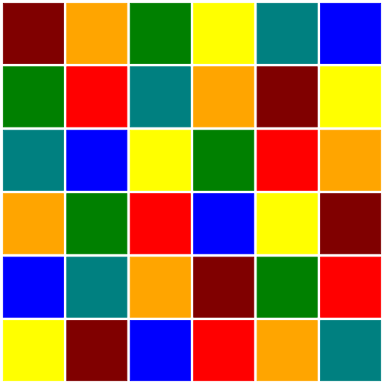
Here are drawings of minimal colourings of the :
and queen graphs:
To check these drawings for properness is easy, even though the edges are not
drawn. Choose a colour and allow your eye to pick up all squares of that
colour. None lie in the same row, column or diagonal. So no pair of that colour
can be occupied by queens who can take each other. Doing this manually for six
or seven colours only takes a few seconds. Of course, we would like to have a
little program to do this automatically for us and that is a topic we will
return to in a subsequent post.
This post has four sections. In the first, we show to use greedy in the
manner it was designed to be used, interactively. In the second section we
introduce a new wrapper interface, ccli, which can be used to drive greedy
and the other of Culberson’s Colouring Programs in a non-interactive way which
is suitable for automated experimentation and has benefits for reproducibility.
In the third section we describe a general scheme for using greedy to
approximate the chromatic number of graphs. In the final section we demonstrate
this approach through a toy experiment into the chromatic number of queen
graphs.
Interactive usage
All of Culberson’s Colouring Programs, including greedy, require input graph
data to be given in DIMACS format. In this section we will demonstrate
how to use greedy to find a colouring of the Chvatal Graph which can be
found in DIMACS format in the
graphs-collection collection of graphs.
To use greedy to colour a graph, call the program from the command-line and
pass the path to the graph data in DIMACS format as an argument.
$ greedy chvatal.dimacs
After an interactive session, detailed below, the resulting colouring will be
appended to a.res (where a is the original filename, including extension).
This file will be created if it doesn’t already exist.
Before the colouring is produced, however, we have to participate in an
interactive session with greedy to determine some options used by the
program in producing the colouring. The first of these options is about whether
we wish to a use a cheat colouring inside the input file as a target colouring.
The purpose of this cheat is explained further in the
greedydocumentation. We won’t be using it here, so we
respond negatively.
J. Culberson's Implementation of
        GREEDY
A program for coloring graphs.
For more information visit the webpages at:

    http://www.cs.ualberta.ca/~joe/Coloring/index.html

This program is available for research and educational purposes only.
There is no warranty of any kind.

    Enjoy!

Do you wish to use the cheat if present? (0-no, 1-yes)
0
The next option we are prompted for is a seed to be used for randomisation.
This provides us with the ability to generate different random colourings
and also to reproduce previously randomised colourings.
ASCII format
number of vertices = 12
p edge 12 24
Number of edges = 24 edges read = 24
GRAPH SETUP cpu =  0.00
Enter seed for search randomization:
1
Responding with 1 leads us to a choice about the type of greedy algorithm we
want to use. There are six types. Again, for more information see the greedy
documentation. For now we will use the simple greedy algorithm.
Process pid = 5315
GREEDY TYPE SELECTION
    1	Simple Greedy
    2	Largest First Greedy
    3	Smallest First Greedy
    4	Random Sequence Greedy
    5	Reverse Order Greedy
    6	Stir Color Greedy
Which for this program
1
The next option concerns the way in which vertices are ordered before the
algorithm starts running. The default is inorder, the order vertices are
given in the input graph file.
Choosing inorder for our initial vertex ordering leads us to the final option,
whether or not we wish the algorithm to use the method of Kempe reductions.
Use kempe reductions y/n
n
The output is in a file called chvatal.dimacs.res and, after only one call,
looks like this:
This is to be interpreted as a colouring of vertices. The first vertex gets
colour 1, the second colour 2, the third colour 1 and so on. With multiple
calls this file is augmented with additional lines of data in this format.
This gives us a simple way of collecting information about many different
runs of the same program, possibly with different options, on the same data.
Non-Interactive Use
In some situations, especially when running multiple simulations with different
parameters, it can be useful to use programs non-interactively. Other benefits
to this approach are that it makes it easier to chain commands together in a
shell environment, for example to take the output of a colouring program and
use it as part of the input to another program that draws a graph and colours
nodes according to the resulting colouring. Another benefit is that it makes
easier the task of documenting and communicating experimental conditions. This,
in turn, can have benefits for reproducibility of results.
For this reason we have developed ccliCulberson’s (Colouring Programs) Command-Line Interface, a wrapper script
around Culberson’s programs that gives them a non-interactive interface.
Although still under development, ccli currently can provide a complete
interface to several of the programs, including greedy.
ccli is built on docopts and expect and requires
both of those programs to be installed as well as Bash 4.0 or newer.
This is the usage pattern for ccli:
ccli algorithm [options] [--] <file>...
where algorithm is one of bktdsat, dsatur, greedy, itrgreedy, maxis
or tabu. The options list allows us to specify any of the same options
that we would specify with the interactive interface. For example, to use
the embedded cheats we add the --cheat switch to the options list. For a
full explanation of all options, consult the online documentation of ccli
(ccli --help).
For example, to use ccli to colour the Chvatal graph file above with the
greedy algorithm of simple type with inorder vertex ordering we call ccli
like so:
Options that are not explicitly specified on the command-line default to
values which can be seen in the usage documentation (ccli --help). For
example, the default for --cheat is for it to be disabled.
As before, the colouring output of this call is augmented to the
chvatal.col.res file. Future versions of ccli will support output to
the standard output which will allow ccli to be used in the manner of
other Unix programs discussed above.
Bounds for the Chromatic Number
The greedy algorithm, both in theory and practice, is a useful tool for
bounding the chromatic number of graphs. For if we have a colouring of a
graph with colours then we know that the chromatic number of that graph
is at most .
Imagine that we have used greedy many times to produce a file a.dimacs.res
which contains many different colourings of the graph a.dimacs. Then we can
use a sed one-liner to extract the number of colours used by each colouring
and put the results into a file.
Now output.txt should contain several lines, each containing a single integer,
the number of colours used in the corresponding colouring. To find the smallest
of these values is just a matter of sorting the file numerically and reading
the value in the first line. We put this number into a file for later
inspection.
sort-n output.txt | head-n 1 > approx.txt
Now the file approx.txt contains a our best estimate for the chromatic number.
Using these little hacks we can devise a simple scheme to use ccli to estimate
the chromatic number of a graph.
Generate a large number of different colourings,
For each colouring, compute the colouring number,
Find the smallest colouring number over all colourings,
Record this value as an approximation to the chromatic number.
If the colourings that we generate are all the same colouring then all of the
numbers are the same. If we use Culberson’s programs in a deterministic way
then we can only hope to generate a number of colourings equal to the number
of combinations of algorithm and vertex orderings. Fortunately, the
non-deterministic features of these programs give us the chance to generate
a lot of different colourings and hopefully come up with better approximations.
The design of ccli makes it very easy to generate a lot of colourings from
the shell. We simply write a loop:
!#/bin/bash
for (( i=1; i<=$1; ++i ))
do
 ccli greedy --type=$2 --ordering=$3 --seed=$RANDOM $4
done
This loop has been written in the form of a script which takes four
parameters. The first is a number of iterations, the second is the algorithm
type, third is the vertex ordering and the fourth is the path to the graph in
DIMACS format. The $RANDOM variable is a Linux environment variable which
generates a random integer and we this used to seed the random number generator
in the greedy program. This means that each iteration produces a different
colouring.
Bounds for the Chromatic Number of Queen Graphs
We have applied the above scheme to queen graphs. A queen
graph is a graph whose vertices are the squares of a chessboard and edges
join squares if and only if queens placed on those squares attack each other.
The chromatic number of queen graphs is still an open problem in general.
According to the Online Encyclopedia of Integer Sequences the
chromatic number of the queen graph of size 26 is unknown. Chvatal
claims that in 2005 a 26-colouring of the queen graph of dimension
26 was found and thus 27 is the smallest unknown order. This follows because
the chromatic number of a queen graph is at least and thus
a 26-colouring of the queen graph proves that the chromatic
number is 26.
In the table below we list graphs from Michael Trick’s
colouring instances page. In the first column is the chromatic
number, if known. Subsequent columns give approximations based on different
parameters for greedy. The parameters are described in the list below the table.
The final column is the quality of the approximation, given by the ratio of the
least colouring number over all colourings to the chromatic number
.
In this post we demonstrate how to take a graph stored in DOT format and draw
it on a webpage using vis.js. The drawing uses vis.js’s repulsion layout
algorithm and we also show how to customise this algorithm to improve the
drawing in this one case.
The DOT language
The DOT graph description language is the graph format used by
Graphviz, one of the oldest graph visualisation tools. More than
just a library or an application, Graphviz is a large collection of tools for
graph visualisation. In an upcoming series we will investigate Graphviz in
detail. For a good introduction to Graphviz try
Let’s Draw a Graph: An Introduction with GraphViz by Marc Khoury.
In this post our interest in the DOT language is due to the fact that vis.js
can load graphs which are written in DOT.
DOT and vis.js
In the first two posts in this series we saw how to draw graphs using vis.js.
In both of those posts the graph objects were created with vis.js directly with
Javascript in the webpage. This is a reasonable approach for small graphs but a
more common scenario is that we already have a graph contained in a file in some
format and want to use the drawing algorithms of vis.js with this pre-existing
graph data.
In this post we consider the above scenario under the presumption that the
graph data is in DOT format. If we have graph data in a format other than DOT
then we must translate it to DOT format before using vis.js. For GML this can
be done with a script gml2gv in the Graphviz project (.gv being the
standard file extension for files in DOT format).
In the remainder of this post we will show how to reproduce the drawing of the
dodecahedron graph (dodecahedron.gv) in the frame below.
Requesting Graph Data
To use external graph data with vis.js needs a little more work than simply
calling a load or import function. The feature of vis.js that allow us to work
with external data in the DOT language is the ability for the the Graph
function to be initialised with a string of DOT data. So to use external data
what is needed is to first create a string of DOT data from a file in DOT
format.
To do this we have to make a HTTP request. This is best done asynchronously to
allow graph data to be loaded while the page is being rendered. One approach is
to use JQuery. Other approaches are
possible but JQuery makes it very easy in this case.
JQuery has an ajax function for making asynchronous HTTP requests. To make
a GET request we simply have to provide a url string as an argument to the
ajax function. In fact, because we are going to also provide other settings,
it is just as easy to pack the url string as a key-value pair inside an
object with other key-value pairs and pass the entire object as a parameter
to the ajax function.
In this case, the only other setting required inside this parameter object is
the success setting. The value of this setting is a function called when the
request succeeds. The data returned by the request is passed to this function
as a parameter which allows us access to the data inside the function body.
To build a Graph object from this data (called dot_str) we call the
Graph function as usual but this time the second parameter, the data
argument, is an object which contains a mapping from a dot key to the DOT
string data which was passed into the function body when the HTTP request
succeeded.
The container and options objects have been created as in previous posts.
In the next section we show how to modify the options object to customise
the layout of the graph so the resulting drawing is more suitable than the
default.
Repulsion Layout Configuration
Layouts in vis.js are determined in a dynamic way after graph data has been
loaded and thus vary from one page view to the next. Nevertheless, there are
some aspects of the default drawing which are consistently undesirable and that
we can fix even if we can’t completely control the exact appearance of the final
graph-drawing. With default settings for the repulsion algorithm a drawing
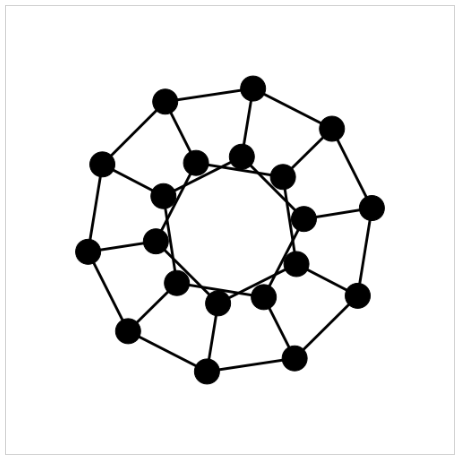
obtained by vis.js of the dodecahedron graph looks something like this:
The edges in this drawing are, arguably, too short relative to the node sizes.
We can fix this by allowing the repulsion algorithm to allow nodes to be placed
further apart thus making nodes appear smaller relative to the drawing size.
Several variables control the behaviour of the repulsion algorithm. These
variables and their effects on the graph drawing are described in the table
below, which is taken from the vis.js documentation.
Name
Type
Default
Description
centralGravity
Number
0.1
The central gravity is a force that pulls all nodes
to the center. This ensures independent groups do
not float apart.
springlength
Number
50
in the previous versions this was a property of the
edges, called length. This is the length of the
springs when they are at rest. During the simulation
they will be stretched by the gravitational fields
To greatly reduce the edge length, the
centralGravity has to be reduced as well.
nodeDistance
Number
100
This parameter is used to define the distance of
influence of the repulsion field of the nodes. Below
half this distance, the repulsion is maximal and
beyond twice this distance the repulsion is zero.
springConstant
Number
0.05
This is the spring constant used to calculate the
spring forces based on Hooke’s Law.
damping
Number
0.09
This is the damping constant. It is used to
dissipate energy from the system to have it settle
in an equilibrium.
A very useful feature of vis.js is an interactive interface that allows you to
configure these values and then export the resulting configuration. To enable
this interface just set the value of the configurePhysics option to true.
options=configurePhysics:true
Now when the page is viewed we are presented with the following interactive
interface which can be used to experiment with different settings for the
three different layout algorithms offered by vis.js.
With straight edges the drawing of dodecahedron graph by the repulsion
algorithm under the default variable settings has very short edges. To increase
the edge length first increase the springLength setting, from 50 to 250, say.
Increasing only the springLength, however, results in a poor layout because
now the node distance prevents nodes from moving farther apart. The remedy is
to increase node distances. Through experimentation a value of 250 for the
nodeDistance gives a layout that makes the symmetry of the dodecahedron
clear.
When the desired settings have been found use the Generate Options button
to create option code which can be cut-and-pasted into the drawing document.
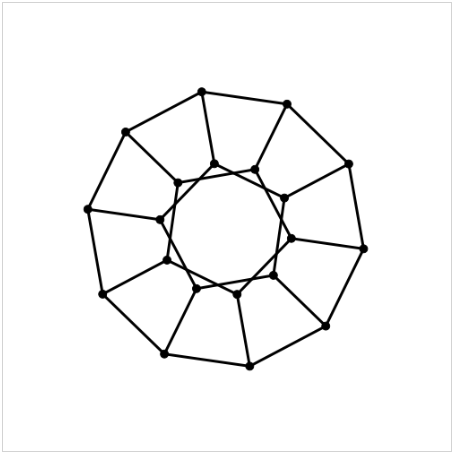
With those settings the drawing of the dodecahedron produced by vis.js looks
something like the next image.
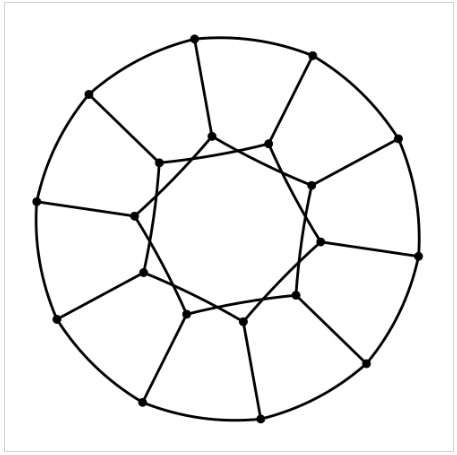
Choosing smooth curves produces a drawing with circular arcs and nearly perfect
angular resolution. Such drawings are called Lombardi Drawings. See
Lombardi Spirograph I: Drawing Named Graphs
for further information.
Complete Source Code
The source code for the above example is shown below in a JSFiddle viewing
widget. The same code is also available as a gist on Github, the output
of which can be viewed on blocks.org.
Further Examples
On the vis.js homepage] this example and this playground
demonstrate the use of the DOT language in vis.js.
There is also another useful example on the vis.js homepage of
configuration options for the physics component of vis.js.